

SanityOps Framework — FAQ
Version: v1.1
Release Date: October 2026
Maintained by: Sanity AI Labs
License: CC BY-SA 4.0
For readers new to SanityOps (AI service managers / Agent developers / operators / test teams / security teams). Answers are based on the official specification documents, with sources cited.
① Getting to Know SanityOps
Q1. What is SanityOps? (Framework + Platform composition) / What is it not?
Answer:
Definition: Vendor-neutral, built on logical-artifact defect inspection, extending into Risk scan and Quality assessment for AI Agents.
Composition: Three loosely coupled professional systems — Inspect (defect inspection), Risk (risk audit and dynamic validation), and Quality (quality assessment) — connected by Relevance, which maps defects → risk/quality.
Delivery forms are the open-source Framework specification (CC BY-SA 4.0) + tools (the
sanityops-inspect-liteskill and the Inspect CLI are open source; Risk/Quality are commercial SaaS / self-hosted).What it is not: It does not replace IAM, network/backend security, production monitoring, model fine-tuning, or data governance; it cannot guarantee that Agents governed by SanityOps are absolutely secure or completely correct; and the conclusions of each system cannot substitute for one another (e.g., "Inspect PASS ≠ Security PASS").
Source:
- core.md 1.1 (Positioning), 0.3 (What Core Is Not), 1.4 (Non-Substitutability Principle)
- overview.md "Introduction", "Framework and Platform", "Key Features"
- about.md "Our Scope"
- sanityops-positioning.md
Q2. Who publishes and maintains SanityOps?
Answer: SanityOps is published and maintained by Sanity AI Labs. For an introduction to Sanity AI Labs, see About.
Source:
- core.md front matter ("Maintained by: Sanity AI Labs")
- terms-of-service.md Section 1 (Sanity AI Labs, registered in Australia)
- overview.md "Contact Us"
② Value and Boundaries
Q3. What can SanityOps bring me? (by reader role)
Answer (by three roles):
- Leaders (CTO/CIO): A standardized, quantified quality-and-safety scaffold for enterprise Agent programs — decisions backed by scores and evidence, not demos.
- Builders (Agent Dev/Test, Platform Eng, FDE): Catch logic defects before they ship, get guided fixes, and wire the governance loop into CI/CD for hot iteration.
- Assurers (QA, Security Audit): Version-synced quality evaluation and explicit/implicit risk baselines, with ratchet gates that block regressions on every artifact change.
Source:
- overview.md "Value", "Use Cases"
- core.md 1.3 (Core Problems and Specification Domains)
- sanityops-positioning.md Section 2 (What It Can Do)
Q4. After SanityOps inspection and assessment, is everything then fine?
Answer: No. SanityOps draws conclusions only within the boundaries of its own evidence domain, and those conclusions cannot substitute for one another: Inspect PASS ≠ Security PASS, Quality PASS ≠ No security risks exist, Single test PASS ≠ Long-term security or quality assurance. It does not promise 100% defect coverage or zero production failures, does not replace IAM, production monitoring, or data governance, and cannot predict unknown attacks. Treat it as a basis for release decisions and continuous governance, not a "one-off" guarantee.
Source:
- core.md 1.4 (Non-Substitutability Principle), 1.1 (does not guarantee that Agents are always correct or absolutely secure)
- about.md "Our Scope"
- tool-agent.md 8.2 (methodology boundaries)
- implicit.md "Conclusion: Limitations and Outlook"
Q5. Does SanityOps evaluate the LLM?
Answer: SanityOps v1.1 does not evaluate the LLM (model) itself. It accepts a given LLM and does not involve model fine-tuning; its assessment objects are the quality and risk of Logic Artifacts (Prompt / Skill / Tool Schema), and the Agent's actual task/service quality. Quality assesses "the LLM's decision quality under a specific task scenario, constrained by Logic Artifacts", not the model's general capability.
Source:
- core.md 1.3, 2.1, 2.2
- about.md "Our Scope"
- sanityops-positioning.md 3.1 (model evaluation benchmark comparison)
- tool-agent.md 3.2 (uncertainty source analysis)
Q6. What is the relationship between SanityOps and observability?
Answer: SanityOps and observability (production monitoring) are complementary, not substitutes: SanityOps is positioned as "pre-release decisions", focusing on defect inspection, risk validation, and quality assessment of Logic Artifacts; production monitoring / observability is a "post-release" responsibility owned by continuous monitoring systems. Although runtime monitoring appears in the governance closed loop diagram, it is explicitly listed as a "future extension" and is not currently a fully covered specialized capability.
Source:
- core.md 1.5 (Full-Lifecycle Governance Closed Loop), 5.4 (Evidence Tiers)
- about.md "Our Scope"
- sanityops-positioning.md Section 2 (current coverage boundaries)
③ Core Concepts
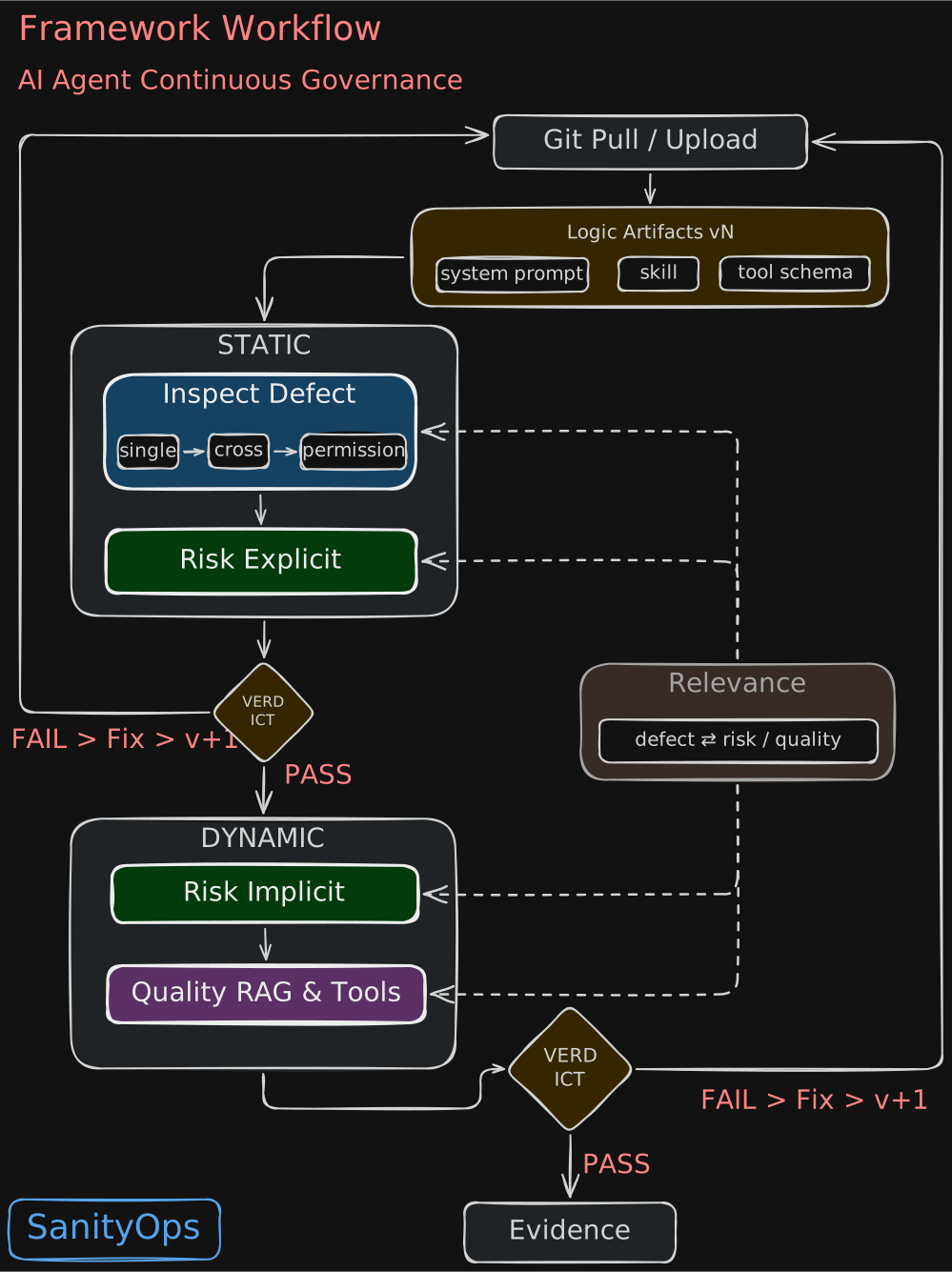
Q7. What is the "Impossible Triangle" of Agent runtime detection?
Answer: It refers to runtime (post-release) detection and assessment of an Agent, where three goals cannot be satisfied simultaneously in principle — ① Detection Real-time (low latency, must not slow down the business); ② Attack Logic Complexity (complex, adaptive, multi-step attacks require deep reasoning); ③ Massive Context Data Processing (multi-turn dialogue, tool returns, memory, knowledge sources — massive data processing). The three constrain one another: pursuing judgment accuracy increases computation and latency; pursuing real-time forces simplified judgment that can only capture shallow, known attacks. Therefore, enterprise runtime protection (such as Guardrail) can only adopt a "low latency, low accuracy" compromise, and is in principle unable to intercept complex logic attacks in real time — this is precisely the fundamental reason SanityOps advocates "Shift Left" (see Q8).
Source:
- overview.md "Background" (Impossible Triangle)
- implicit.md 1.2 (including 1.2.1~1.2.4)
Q8. Why should quality and safety inspection shift left?
Answer: Because runtime (post-release) detection and assessment is constrained by the "Impossible Triangle" (see Q7) and cannot discover complex defects and attacks in real time; meanwhile, Agent Logic Artifacts have a "high-frequency hot-iteration" characteristic — every time a Prompt, Skill, or Tool Schema is modified, the same classes of problems recur. Together these mean that "relying on runtime monitoring after release as a backstop" does not work, so inspection must "shift left" into CI/CD: run Inspect/Risk/Quality checks before release and in sync with every artifact change. After shifting left, one must still answer "what to check, by what standard, and by what criterion to release", which is exactly what SanityOps's three specification domains solve.
Source:
- overview.md "Background"
- core.md 1.5 (Full-Lifecycle Governance Closed Loop)
Q9. What is a Logic Artifact?
Answer: A Logic Artifact is a structured, versionable asset that constrains and guides the LLM, and is SanityOps's "First-Class Governance Asset". Based on the hosting field, content independence, and direct influence on the LLM, SanityOps strictly limits the core types to three: System Prompt (instruction), Skill (behavior definition), and Tool Schema (structured tool definition). Agent, Workflow, Knowledge Source, Memory, Identity / Policy, etc. are defined as "objects" in Core, but Logic Artifacts (first-class governance assets) are limited to the three types above.
Defect inspection for A2A-type Agents will be delivered as SanityOps v1.1.
Source:
- core.md 1.2.1 (Definition, limited to three types)
- core.md 1.2.2 (Minimum Governance Requirements)
- core.md 2.1 (Core Objects), 2.2 (Currently Covered and Extended Objects)
Q10. Why take Logic Artifacts as the object?
Answer: SanityOps takes Logic Artifacts as its governance object because it "lacks a compiler": Prompts / Skills / Tool Schemas have no mandatory static checks, so their definition defects, unclear boundaries, and contradictory constraints are not discovered at write time but are projected directly into LLM reasoning, becoming the common root of the three problems of quality, security, and root-cause localization. Logic Artifacts are both "the most important root cause and the most controllable clue", and are identifiable, versionable, inspectable, verifiable, and auditable.
Source:
- core.md 1.1 (Positioning), 1.2 (First-Class Governance Assets), 1.2.2 (Minimum Governance Requirements)
- overview.md "Background" (Impossible Triangle), "Introduction" (starting from defects and permissions), "Key Features" (compiler analogy)
Q11. Why is it called continuous governance?
Answer: Because Logic Artifacts' "hot-fix" frequency is far higher than traditional code and spans the full lifecycle, and the same classes of defects recur with every change to a Prompt / Skill / Tool. SanityOps therefore defines "full lifecycle" as a governance closed loop that continuously drives Inspect → Risk → Quality → Gate around every artifact change, and uses the Ratchet Mechanism to bind versions to scores so the level can only move forward, not backward — rather than a one-off pre-release admission check.
Source:
- core.md 1.5 (Full-Lifecycle Governance Closed Loop)
- overview.md "Background" (hot iteration), "Framework Workflow" (closed loop)
Q12. What is hot iteration?
Answer: Hot iteration (hot-fix) refers to teams frequently making immediate, temporary, unplanned, fine-grained adjustments because Logic Artifacts are extremely cheap to adjust and fixes are directly perceptible. Its trouble: every time a Prompt, Skill, or Tool Schema is modified, the same classes of problems recur; and runtime assessment and detection are constrained by the "Impossible Triangle" (Detection Real-time, Attack Logic Complexity, and Massive Context Data Processing cannot all be satisfied), so inspection must shift left (earlier, into CI/CD) and run in sync with every iteration. The challenge is that artifacts lack quality and security constraints, so every iteration introduces new uncertainty.
Source:
- overview.md "Background" (high-frequency hot iteration, Impossible Triangle, Shift Left)
- core.md 1.5 (full lifecycle around every artifact change)
Q13. What is the difference between traditional programs and Agent CI/CD?
Answer: Traditional programs have a compiler that enforces syntax/type/interface checks before execution; defects are intercepted at compile time, and quality and security have a deterministic static backstop. Agent Logic Artifacts (Prompt / Skill / Tool Schema) have no compiler and no mandatory static checks; defects are not intercepted by any tool in advance but are projected directly into LLM reasoning. Moreover, because artifacts are extremely cheap to adjust and teams modify them with high frequency, every change introduces new uncertainty. Therefore Agents cannot rely on the "intercept at compile time" backstop of traditional code, and must shift inspection left (earlier, into CI/CD) and run it in sync with every artifact change.
Source:
- overview.md "Background" (compiler / Shift Left / hot iteration)
- tool-agent.md 3.3 (continuity requirement of assessment)
- core.md 1.2.2 (Logic Artifacts should be treated as engineering assets)
Q14. What is the Ratchet Mechanism? Where is it used?
Answer: The Ratchet Mechanism is a cross-round constraint that "can only move forward, not backward": it binds each quality/security quantified score to a version and records the historical best; when a new version falls below the historical best it raises an alert and recommends blocking the release, ensuring fixed defects do not recur and narrowed permissions do not expand — any relaxation must be explicitly approved. It is used in hot-iteration scenarios such as version iteration, Prompt optimization, and regression detection, to prevent quality regression and ensure production always runs the optimal version.
Source:
- tool-agent.md 4.5 (historical best, warning trigger, release recommendation)
- core.md 8.2 (Baseline: a confirmed, reproducible, comparable versioned result snapshot)
- overview.md "Key Features" (ratchet mechanism synchronized with Logic Artifact versions)
Q15. What is a Shadow Sandbox? How does it differ from a traditional sandbox?
Answer: A Shadow Sandbox is an isolated assessment environment equivalent to production: it contains Logic Artifact replicas, an LLM API with the same configuration (same model, same parameters), Mock data and services, and an independent execution container. It faithfully replicates production (same artifact version), yet achieves full isolation through Mock dependencies and network/storage isolation, so attacks or assessments never touch real data or the business. The difference: a traditional sandbox only isolates the execution container and does not itself provide adaptive Mock capabilities equivalent to production data/services; to obtain realistic results it often needs to directly access or call production tools and data, thereby exerting additional impact — even risk — on production systems. The Shadow Sandbox, by contrast, uses adaptive Mock data and services to faithfully replicate production inside an isolated environment, touching no real data while still yielding trustworthy conclusions.
Source:
- tool-agent.md 4.1.1 (Shadow Sandbox)
- implicit.md 1.6.2, 5.5 (Shadow Sandbox composition)
- overview.md "Key Features"
Q16. What does the governance closed loop mean in SanityOps?
Answer: The governance closed loop means the four activity types (Inspect / Relevance / Risk / Quality) are not isolated checkpoints but a traceable chain around Logic Artifact version iteration: Inspect finds defects (QD) → Relevance maps attack surfaces / failure modes → Risk confirms risk evidence and Quality assesses quality → human review determines the root cause and remediation scope → fix, re-inspect, regress → release or exception decision. Every artifact change re-triggers the loop, evidence accumulates continuously, and the Ratchet Mechanism prevents quality/security levels from regressing.
At the component level, this loop can be drawn as the workflow below — Inspect performs static checks, Relevance performs defect mapping, Risk/Quality perform dynamic validation and assessment in the Shadow Sandbox, and Gate makes the release decision based on the Baseline and Ratchet Mechanism; the loop automatically re-runs whenever a Logic Artifact version changes:
Source:
- core.md 1.5 (eight-step Full-Lifecycle Governance Closed Loop)
- overview.md "Framework Workflow" (closed loop and Gate)
- sanityops-positioning.md Section 2 (governance closed-loop overview)
Q17. When does re-inspection / re-assessment need to be triggered?
Answer: Six trigger conditions: ① version update (artifact / model / retrieval / workflow changes, triggering the corresponding regression scope by L1~L4 change level); ② re-inspection after defect remediation; ③ runtime anomaly (precision-inspect the relevant items once monitoring detects an anomaly); ④ user feedback (after a complaint / negative feedback is confirmed); ⑤ periodic re-inspection (by Agent level: L1 monthly / L2 weekly / L3 daily); ⑥ degradation (when new defects are traced through the historical chain and determined to be degradation). Permission, responsibility, and level changes also trigger it.
Source:
- cross.md 7.1, 7.2.3
- core.md 8.4 (Re-inspection and Regression)
- rag-agent.md 6.2 (change levels L1~L4)
- permission.md 11.1
Q18. When is human confirmation required?
Answer: Five scenarios require human confirmation: ① high-risk / irreversible operations (production write/delete, refunds, etc.) must declare human confirmation or prior approval; ② when rules conflict with the Judge, the Judge has low confidence, or high-risk boundary cases are ambiguous, they enter a conflict queue for human review; ③ root-cause determination (involving exploitability, risk acceptance, release exceptions) must be documented and human-confirmed; ④ approval and review of Risk Acceptance / Exception must be authorized, time-limited, and traceable; ⑤ conclusions with low confidence / insufficient evidence must be re-reviewed after additional evidence is gathered.
Source:
- core.md 5.6, 9.2, 9.3, 9.6
- relevance.md 0.4, 4.3
- rag-agent.md 5.3
- permission.md QD-PM-6.3
④ How the Three Subsystems Work and How to Use Them
4.1 Principles
Q19. What can these framework files do?
Answer: These Framework specification documents (Core, Relevance, five Inspect, two Risk, two Quality) can serve five kinds of reference: ① go-live admission reference (three Gates — Inspect + Risk + Quality — plus the evidence chain); ② development specification reference (static checklists for Prompt / Skill / Tool Schema / cross-artifact / permission); ③ quality assessment reference (per-dimension metrics and thresholds for RAG / Tool Agents); ④ risk and vulnerability reference (Explicit Risk audit + Implicit attack validation methods); ⑤ building your own toolchain (freely adaptable under CC BY-SA 4.0, to build your own inspection tools; not a substitute for the commercial Platform).
Source:
- overview.md "Architecture" (5 Inspect + 2 Risk + 2 Quality + Relevance + Core), "Use Cases" (three Gates)
- index.md Quick Links (read by role)
- try-the-tools.md "implement the methodology yourself"
- sanityops-positioning.md Section 2 (what it can do, delivery forms)
Q20. What are the principles behind Inspect prompt / skill / tool?
Answer:
- Prompt: layered by "LLM detection capability". Chapter 1 logic defects (contradictions, mismatches, etc.) are formalizable, context-self-sufficient, and binary-decidable, and the LLM finds them by reading directly; Chapter 2 structural/completeness defects the LLM does not proactively attend to and require an explicit checklist; Gray-Zone defects the LLM can identify but unstably, requiring human review.
- Skill: classified into five categories by "risk principle", the core being the LLM Default Gap-Filling Behavior — missing boundaries lead to inferring a broader scope, unbounded words lead to unbounded execution, semantic ambiguity leads to "reasonable assumptions" that overflow, undefined failure leads to "best-effort" self-expansion, and unclear permissions lead to treating a broad description as implicit authorization.
- Tool: "layered + tiered". First inspect by layer (structure → parameters → high-risk → semantics → Schema changes), then tier by risk level L1/L2/L3 (7/12/16 inspection items); the same defect's level rises with the risk level.
Source:
- prompt.md Chapter 1, Chapter 2, 1.6
- skill.md 1.1 (Five Defect Classification Framework)
- tool.md Part Two, Part Three
Q21. What is the relationship between Inspect Permission and existing permission management?
Answer: Inspect Permission and IAM / permission management systems are an "upstream/downstream" relationship, not a substitution: it only statically checks whether permission constraints and "responsibility–permission proportion" are declared within Logic Artifacts; it does not check the IAM/IdP deployment layer, runtime PEP/PDP (policy enforcement point / decision point), or monitoring. Its output (proportionality determination, permission list, and business-purpose statements) can serve as input to IAM policy design and PEP rule generation, but it does not promise or replace those downstream capabilities. Key boundary: it checks the credentials/authorization scope "declared within the artifact", not the effective policy "actually configured on the platform"; a PASS conclusion ≠ runtime permission security.
Source:
- permission.md 0.1.4 (out of inspection scope, declared-in-artifact vs actually-configured-on-platform, downstream integration interfaces)
- permission.md 1.5.1 (why extracted as an independent subset)
- core.md 0.3 (does not replace IAM, backend controls)
Q22. What is the relationship among SanityOps's three professional systems?
Answer: The three professional systems are loosely coupled, each independently complete, and flexibly combinable: Inspect checks static defects, Risk checks security risks, Quality assesses output quality; each has independent value and can be adopted alone or combined as needed. But their conclusions cannot substitute for one another: Inspect PASS ≠ Security/Quality PASS, Risk not exploited ≠ no defects, Quality PASS ≠ no risks. Relevance connects the three, mapping defects to attack surfaces, failure modes, and regression scope, and "correlation ≠ causation".
Source:
- core.md 1.3 (four specification domains), 1.4 (Non-Substitutability Principle)
- overview.md "Architecture" (division of labor among subsets)
- sanityops-positioning.md Section 2 (governance closed-loop overview)
Q23. How does SanityOps grade Agents?
Answer:
- AC-L (Agent Complexity Level): how complex are the structure, collaboration, and execution form? Determines Inspect depth and inspection scope (applicability).
- OR-L (Operation Risk Level): how high is the risk of the operations a Skill/Tool can perform (permissions, side effects, irreversibility, impact scope, exfiltration)? Determines severity level and control strength.
- BI-L (Business Impact Level): how severe are the consequences of task failure? Used by Quality Tool-Agent.
- CH-L (Change Level): how large is the change scope and regression strength? Used by Quality RAG-Agent and change governance.
They must not be conflated: the four answer different questions and must carry the model prefix (e.g., OR-L2); applicability is determined by AC-L and severity by OR-L — conflating them would underestimate simple high-risk Agents such as "AC-L1 + OR-L3", or force conclusions about nonexistent forms.
Source:
- core.md 4.1 (Grading Models Must Not Be Conflated), 4.2 AC-L, 4.3 OR-L, 4.4 BI-L, 4.5 CH-L
- permission.md 1.4 (level binding)
Q24. Does every SanityOps tool have a quantified score?
Answer: Not every tool has a unified score; each subset's scoring model is independent: Permission uses a 100-point deduction system (P0:P1:P2 = 5:3:1), but the primary criteria are the Gate conclusion + defect list, and the score is used only for trend comparison; Quality RAG-Agent uses 12 metrics across four dimensions, weighted by test-case risk to compute a total score, used only for trend observation and version comparison. Scores never substitute for the Gate: any P0 defect, critical factual error, high-risk boundary misjudgment, or successful attack (Status A) results in FAIL. A cross-subset total risk score must be defined by a separate model and must not be mechanically summed.
Source:
- rag-agent.md 2.4, 3.7
- permission.md 12.1
- core.md 4.9, Appendix B
Q25. What determination methods does SanityOps use?
Answer: Three types of determination methods: ① static defect inspection (Inspect) — item-by-item determination via an automated Checklist (Automated / Semi-automated / Human), with Gray-Zone defects using "LLM result + human review"; ② quality determination (Quality) — Rule Verification (numbers / dates / formats / prohibited behavior), LLM-as-Judge (semantics / relevance / completeness), and Embedding Assistance (paraphrase screening); for Tool Agents, Binary Determination of success/failure (structured exact match, natural-language semantic match, crash/timeout = failure); ③ risk determination (Risk Implicit) — the four dynamic-attack termination statuses A Attack Successful / B Blocked by Third Party / C LLM Refused / D Conditions Not Met.
Source:
- rag-agent.md 5.2
- tool-agent.md 4.1.3, 5.2
- prompt.md 3.4
- implicit.md 4.2
Q26. What defect or risk levels does SanityOps have?
Answer:
- P0/P1/P2 (Static Audit Disposition Level, shared by Inspect and Risk Explicit): P0 Blocking Defect, must be fixed, and must not pass the Gate if undisposed; P1 Major Defect, fix before release; P2 Improvement Item, add to the plan.
- Explicit·P0/P1/P2 (Risk Explicit grading): P0 Block release, P1 Fix before release, P2 Record in risk ledger (graded by worst possible consequence; D1/D2/D3 are traceability-only impact type labels).
- A/B/C/D (Risk Implicit termination status): A Attack Successful; B Blocked by external control; C Agent/model refused; D Insufficient conditions / indeterminable.
Source:
- core.md 4.6~4.8, Appendix B.2
- explicit.md 3.2 (Explicit·P0/P1/P2 grading)
Q27. How are Quality test cases generated?
Answer: Quality generates test cases separately for the two Agent types. Tool-Agent: the Mock Data Agent takes Logic Artifacts (System Prompt / Skill / Tool Schema) as input, parses Schema constraints, identifies Skill branches, and generates simulated data conforming to structural constraints, covering normal / boundary / exception scenarios. RAG-Agent: extracts atomic knowledge units and key rules from authoritative materials, automatically generates candidate questions, expected conclusions, and test variants, which are then confirmed by business experts, frozen as a version, and added to the regression set.
Source:
- tool-agent.md 4.1.2, 5.1
- rag-agent.md 4.3, 4.4
- overview.md "Key Features"
4.2 Execution Order and Dependencies
Q28. Why must the basic Logic Artifact inspection be completed before subsequent inspections can run?
Answer: Because permission proportionality is a semantic determination that depends on a trustworthy responsibility baseline; if the baseline itself is defective (a Prompt's responsibilities are self-contradictory, a Skill's declaration is inconsistent with the Prompt, or a Tool's description cannot determine operation semantics), the proportionality determination loses its reference and produces "reasoning noise under a wrong premise" rather than inspection results. Therefore the order must be single-artifact first, then cross-artifact, with permission last (Gate-0 intercepts unremediated P0).
Source:
- permission.md 0.1.5 (four-stage order, basis for the order, Gate-0)
- core.md 1.4 (Non-Substitutability Principle), 1.5 (closed-loop order)
Q29. Why is it recommended to run Inspect first, then Quality and Risk?
Answer: First run Inspect to produce a static defect list; Risk Implicit then generates targeted attack cases from it (artifact-driven), and Quality designs supplementary tests based on the defects, avoiding inefficient blind testing. Locating root causes statically first, then dynamically validating exploitability and reliability, is efficient and traceable. But Inspect only checks static defects; passing ≠ Security/Quality pass, and it must be confirmed by Risk dynamic validation and Quality actual output.
Source:
- implicit.md 3.1.1, 2.3.1
- tool-agent.md 5.3
- relevance.md 0.4, 1.4
- core.md 1.3, 7.1
Q30. Can SanityOps tools be used independently?
Answer: Yes, they can be used independently. The three — Inspect / Risk / Quality — are "loosely coupled, each independent, and flexibly combinable", each with independent value: doing only Inspect checks artifact rigor, doing only Quality quantifies output quality, and doing only Risk completes a security audit. The framework explicitly supports "phased adoption" — an organization need not implement all capabilities at once and can build progressively by implementation stage (basic governance → verifiable → governable → sustainable operations → extensible governance); combining the three forms a complete governance closed loop.
Source:
- try-the-tools.md "Why Are Inspect, Risk, and Quality Unified into the SanityOps Platform?" (use just one, or combine freely)
- core.md 10.1 (phased adoption), 10.2 (implementation stages)
- overview.md "Framework and Platform" (Inspect CLI open source, Risk/Quality commercial)
4.3 Mapping and Correlation
Q31. What is the mapping between defects and quality/risk? Please give examples.
Answer (QD-* are Inspect defect IDs: QD-P = Prompt, QD-S = Skill, QD-T = Tool): ① Single-defect mapping: QD-P-2.5.2 Missing security boundary constraints → instruction boundary confusion, unauthorized responses, sensitive information output, recommending "injection / system prompt extraction / unauthorized request validation"; QD-T-3.2 Raw input passthrough → input and parameter injection attack surface. ② Defect-chain mapping: QD-P-2.5.2 missing security boundary + QD-S-5.1 read/write/delete not distinguished + QD-T-3.2 raw passthrough + QD-T-3.5 cross-Tool data flow risk = injection → unauthorized call → sensitive data exfiltration candidate chain.
Source:
- relevance.md 1.4 (single-defect mapping), 1.5 (defect-chain mapping)
Q32. What is Relevance? How does it correlate defects to risk and quality?
Answer: Relevance is one of SanityOps's four specification domains, answering "which attack surfaces, validation strategies, failure modes, and regression requirements a static defect may correlate with". It maps the QD defects found by Inspect in a four-stage structure: defect layer → impact layer (Attack Surface AS, candidate Failure Mode FM) → validation layer (Risk validation recommendations, Quality supplementary test recommendations) → evidence layer, and identifies defect chains that accumulate across artifacts. Its core principle is "correlation ≠ causation": mapping produces only risk correlations and validation recommendations, and does not automatically prove that an attack has succeeded or quality has failed.
Source:
- relevance.md 0.1, 0.4, 1.1, 1.2
- core.md 1.3
- sanityops-positioning.md Section 2
4.4 Outputs and Reports
Q33. How many kinds of output reports does SanityOps produce?
Answer: SanityOps output reports come in two types: audit and summary. There is one of each per subset — Inspect, Risk Explicit, Risk Implicit, Quality — for 8 in total; the naming convention is Voyager_{subset}-{audit|summary}_{date}.pdf. Outputs also include the Relevance diagnostic correlation and the Gate release-decision summary.
Source:
- samples/results/ — platform reports section (8 PDFs: inspect/explicit/implicit/quality × audit/summary)
- core.md 6.2 (release summary status)
Q34. What are the summary report samples?
Answer: Summary reports: 4 samples in total (Voyager project):
- Voyager_inspect-summary_20260927.pdf
- Voyager_explicit-summary_20260927.pdf
- Voyager_implicit-summary_20260926.pdf
- Voyager_quality-summary_20260927.pdf
Source:
- samples/results/ — platform reports section
Q35. What are the audit report samples?
Answer: Audit reports: 4 samples in total (Voyager project):
- Voyager_inspect-audit_20260927.pdf
- Voyager_explicit-audit_20260927.pdf
- Voyager_implicit-audit_20260926.pdf
- Voyager_quality-audit_20260927.pdf
Source:
- samples/results/ — platform reports section
4.5 Samples and Walkthroughs
Q36. What is a typical example of Agent Logic Artifact inspection and remediation?
Answer: There are 3 typical inspection-and-remediation examples (each with a complete remediation process):
- energy-management-assistant.md Energy Management Assistant
- freight-logistics-assistant.md Freight Logistics Assistant
- medication-information-assistant.md Medication Information Assistant
Source:
- samples/cases/ directory
⑤ Ecosystem Positioning and Comparisons
Q37. What is the difference between Quality and RAGAS?
Answer: The core difference lies in the governance level; the two are not the same kind of competitor. RAGAS is a standalone open-source RAG evaluation library focused on quantifying the output quality of retrieval-augmented generation pipelines; it covers only the single "evaluation" step, does not form an "evaluation → localization → remediation → re-evaluation" loop, and has no release gate, regression governance, or evidence chain. SanityOps Quality is a quality subset embedded in the governance framework and, together with Inspect/Risk/Relevance, forms a closed loop: it links quality results with defect localization, release gates, version regression, and evidence retention. In one sentence: RAGAS answers "what score does the output get", while SanityOps Quality answers "can it be released, where is the problem, how to ensure it continuously, and is the evidence complete".
Source:
- compare-with-ragas.md
- sanityops-positioning.md 3.2 (RAGAS row), 6.3
Q38. What is the relationship between Risk Implicit and Red Team?
Answer: Risk Implicit is a paradigm evolution of traditional Red Teaming: it upgrades "black-box blind testing" to "artifact-driven validation". Traditional red teaming relies on generic attack libraries for blind testing, with low hit rates and rigid payloads, cannot see enterprise-specific artifacts such as the System Prompt and Tool Schema, and tests in production environments, bringing data/business/compliance risks. Implicit starts from artifact defects to generate targeted attack cases and dynamically validates implicit risks in a completely isolated Shadow Sandbox, outputting a quantifiable security Signal.
Source:
- implicit.md 1.4, 7.2, 7.6
- sanityops-positioning.md 3.1 (Red Teaming methodologies row)
Q39. What is the difference between Risk Implicit and Promptfoo?
Answer: Promptfoo is a standalone prompt evaluation / Red Team tool that generates attack cases driven by policies/templates and only judges whether an attack payload is defended (Pass/Fail); it has no built-in sandbox isolation, no root-cause localization, and does not parse the internal structure of user artifacts. Risk Implicit is artifact-driven (generating targeted attacks based on Inspect defects), has built-in Shadow Sandbox isolation, and localizes root causes at the clause level across the four layers Prompt/Skill/Tool/Cross, quantifying Signal and Gate decisions through the A/B/C/D termination statuses. The two are not substitutes; Promptfoo can serve as an external attack-generation component of Implicit.
Source:
- compare-with-promptfoo.md
- sanityops-positioning.md 3.2 (Promptfoo row)
Q40. What is the relationship between SanityOps and FDE?
Answer: FDE is the executor — transforming AI capabilities into business outcomes; SanityOps is the quality infrastructure that supports FDE's high-quality delivery (methodology + toolset Inspect/Risk/Quality). FDE proactively uses it at each stage: during design, using Inspect rules to guide artifact design; during development, running Inspect to fix defects; before release, validating via Risk+Quality; after release, relying on Quality for continuous monitoring and asset accumulation.
Source:
- sanityops-and-fde.md "1. Foundational Positioning", "4. Key Collaborative Relationships", "6. Summary"
Q41. What is the relationship between SanityOps and Harness?
Answer: An Agent system can be understood as two parts: Logic Design (Blueprint) and Runtime Implementation (Harness). SanityOps targets the blueprint layer (Prompt → Skill → Tool Schema), ensuring the rules themselves are worth executing; Harness targets the runtime layer, ensuring the rules are executed correctly. The parameter constraints in the Tool Schema are the basis for Harness's runtime interception; the Gate aggregates Inspect/Risk/Quality to make the "whether it can run" release decision, while Harness is responsible for "how it runs and how to intercept".
Source:
- sanityops-and-harness.md "1. Principles", "4. Summary in One Sentence"
Q42. What is the relationship between SanityOps and OWASP, NIST?
Answer: SanityOps and standards such as OWASP, NIST, and ISO/IEC are complementary, not substitutes. OWASP LLM Top 10 / Agentic AI Top 10 defines the risk classification language ("what to defend against"); NIST AI RMF and ISO/IEC 42001 define organizational-level governance and management-system frameworks ("how to govern"); SanityOps provides executable inspection, validation, and measurement specifications for Logic Artifacts (Prompt / Skill / Tool Schema), using QD defects, the evidence chain, and gates to support the former. It references the principles of these standards but does not constitute any standard certification or compliance claim, nor does it replace a complete management system.
Source:
- sanityops-positioning.md 3.1
- rag-agent.md Chapter 7
Q43. What is the relationship between OWASP AI risks and SanityOps defects?
Answer: OWASP LLM/Agentic Top 10 describes "the final form of an attack" (symptoms), while SanityOps defects describe "the preconditions for a successful attack" (cause); the two are a causal chain rather than substitutes. The defects found by Inspect and OWASP attack types are a many-to-many mapping. Three-layer mapping: OWASP risk (symptom layer) → exploit-chain analysis (preconditions) → SanityOps defect (cause layer QD-P/S/T/Cross, i.e., Prompt/Skill/Tool/cross-artifact defect IDs) → remediation priority (P0 / linked / P1P2). That is, OWASP provides the risk classification language, and SanityOps provides fixable artifact-level defects and attack-surface mapping.
Source:
- implicit.md 8.1, 8.2, 8.3, 8.4
- sanityops-positioning.md 3.1
Q44. What is the relationship between SanityOps and Guardrail?
Answer: Guardrail is a runtime verification layer (LLM-as-a-Judge that intercepts each critical operation in real time); constrained by the "Impossible Triangle" (Detection Real-time / Attack Logic Complexity / Massive Context Data Processing), enterprises can in practice only adopt a "low latency, low accuracy" compromise and can, in principle, intercept only known, simple, pattern-based attacks. SanityOps Risk Implicit is a pre-deployment validation layer (Shift Left) that performs dynamic attack validation on Logic Artifacts in an isolated Shadow Sandbox, proactively discovering and fixing vulnerabilities. The two are complementary: SanityOps is the prevention layer and Guardrail is the runtime protection layer — an attack that bypasses the Agent logic may still be intercepted by the Guardrail (termination status B).
Source:
- implicit.md 1.2, 1.3, 4.2.2, 7.5, 7.6
Q45. Why can't Guardrail intercept complex logic attacks in real time? (Impossible Triangle)
Answer: The "Impossible Triangle" of AI real-time monitoring refers to three things that cannot be satisfied simultaneously in principle: ① Detection Real-time (low latency); ② Attack Logic Complexity (complex, adaptive, multi-step, requiring deep reasoning); ③ Massive Context Data Processing (multi-turn dialogue, tool returns, memory, knowledge sources). Strengthening accuracy increases computation and causes latency of 500ms–2000ms+; pursuing real-time forces a simplified model that can capture only shallow attacks. Enterprise Guardrails therefore commonly adopt a "low latency, low accuracy" compromise and can, in principle, intercept only known, simple, pattern-based attacks.
Source:
- implicit.md 1.2 (including 1.2.1~1.2.4)
Q46. Limitations of Guardrail: why can't it be circumvented by engineering means?
Answer: The limitations of the Guardrail (runtime protection layer) stem from the "Impossible Triangle" (see Q45): under the premise of real-time (low latency), it cannot simultaneously complete deep reasoning about complex / adaptive / multi-step attacks and complete processing of long-context evidence (multi-turn dialogue, tool returns, memory, knowledge sources). "Cannot" here is not "the current model is not fast enough" but a structural tension — attackers actively split, dilute, deform, and spread malicious intent across turns, maximizing "the amount of evidence that needs reasoning" while minimizing "single-point visible signals", pushing the defense line to the worst corner of the triangle. Common engineering measures cannot truly break this frontier:
- Layered/cascaded guardrails (cheap classifier + heavy-model escalation) — only reduce average latency, not the worst case; and the "whether to escalate" routing decision is itself shallow, so a complex attack that fools the router will never be escalated and still passes the shallow check.
- Streaming/asynchronous/post-hoc auditing — abandons the "real-time" vertex: judgment comes after the action, detecting only post-hoc, not intercepting in advance.
- Caching/retrieval acceleration/distillation/quantization/speculative decoding/hardware acceleration — caching only hits known patterns; distillation and quantization trade capability for speed, again sacrificing the "judgment complexity" vertex; the rest only reduce the constant factor and do not reduce the irreducible cost of "deep reasoning over long context".
- Stronger/security-specialized models — stronger models are often slower and more expensive, and the offense-defense arms race moves the frontier in sync.
Therefore, the Guardrail as a "shallow, fast, last layer" defense-in-depth is necessary but not sufficient: it can stop known, simple, pattern-based attacks but cannot reliably intercept novel, adaptive, deeply semantic, cross-turn-deformed attacks. Determinations that genuinely require deep reasoning can only be placed in offline, non-real-time, non-critical-path stages — i.e., pre-release (Shift Left) Inspect/Risk/Quality. This is precisely the fundamental reason SanityOps advocates Shift Left (see Q8).
Source:
- implicit.md 1.2 (including 1.2.1~1.2.4)
- overview.md "Background" (Impossible Triangle)
Q47. What is the difference from SkillSpector?
Answer: SkillSpector is a security scanner for Skill packages: single-scan, strongest at malicious code and dependency CVE/supply chain, but it only does security scanning, has no cross-artifact consistency, does not execute the object under test, and has no governance closed loop. SanityOps is an Inspect + Risk governance closed loop: it covers logic design defect inspection, cross-artifact consistency (Inspect Cross), Shadow Sandbox dynamic validation (Risk Implicit), and post-remediation re-inspection/regression, outputting defect IDs, risk severity levels, and root-cause localization. The two are complementary, not substitutes: use SkillSpector to gate externally introduced Skills, and run the full SanityOps chain for internally developed artifacts.
Source:
- compare-with-skillspector.md
- sanityops-positioning.md 3.2 (SkillSpector row)
⑥ Adoption, Deployment, and Remediation
Q48. How does the SanityOps Platform upload Logic Artifacts?
Answer: Onboarding Logic Artifacts is done via the CLI: sanityops-cli init generates .sanityops/inspect_config.yaml (fill in artifact paths and LLM credentials), and sanityops-cli inspect scans locally; you can optionally connect to the Platform (sanityops-cli config server.api_key), and the scanned artifacts are then pushed to the Platform project as a new version. The README also mentions "near-real-time synchronization with Git". Risk/Quality checks are provided only by the Platform (SaaS / self-hosted), not in the open-source CLI.
Source:
- try-the-tools.md Quick Start, Two Ways to Run the CLI, CI/CD Integration
- overview.md "Introduction" (near-real-time synchronization with Git), "Get Started"
Q49. Is SanityOps open source?
Answer: SanityOps adopts a layered open-source strategy: the core Framework specification (11 sub-specifications: Inspect/Risk/Quality/Relevance/Core) is open source under CC BY-SA 4.0; two inspection tools are open source — the sanityops-inspect-lite skill (CC BY-SA 4.0), a lite version for quick in-agent checks, and the Inspect CLI (Apache 2.0), covering the full Inspect inspection (including Permission) and Risk Explicit. The Platform — including Inspect, Risk, and Quality — is not open source (closed-source SaaS / self-hosted), but enterprise customers under specific contractual conditions can obtain code-review access under NDA.
Source:
- try-the-tools.md Openness Overview
- overview.md "License", "Framework and Platform"
Q50. How does SanityOps charge?
Answer: The Framework specification is free and open source (CC BY-SA 4.0); two inspection tools are open source — the sanityops-inspect-lite skill (CC BY-SA 4.0) and the Inspect CLI (Apache 2.0) — both run on your own model credentials at no charge; the commercial full-featured version (Defect Inspector, Risk Scanner, Quality Evaluator) is provided as SaaS / self-hosted. The hosted platform has no fixed public per-day limit (quota is confirmed together with your invite code); pricing is not listed and requires contacting sales (hello@sanityops.org).
Source:
- try-the-tools.md Openness Overview, Risk & Quality, Usage quota
- overview.md "Framework and Platform", "Get Started", "Road Map"
Q51. Can SanityOps be tried out?
Answer: Yes. demo.sanityops.org provides an online demo of the full Inspect+Risk+Quality loop (in an early-access phase, invite-only, due to third-party LLM inference costs). How to request access: open the demo and click Register, click Get Code on the registration form, and the dialog shows the address to write to; email hello@sanityops.org from your registration email describing your use case, and we will send an invite code. In addition, both open-source tools — the sanityops-inspect-lite skill and the CLI (sanityops-cli) — are free to use locally.
Source:
- try-the-tools.md Risk & Quality — Live Demo
- overview.md "Get Started"
Q52. Does SanityOps support self-hosted deployment?
Answer: Yes. The commercial Platform offers enterprise self-hosted deployment: the full stack (detection engine, database, dashboards) is delivered within the customer's VPC; the model layer is decoupled and can connect to your own LLM (including locally deployed models), without depending on external APIs; contracted enterprise customers can obtain code-review access under NDA. A self-hosted environment does not transmit data back to Sanity AI Labs (as stated in the Privacy Policy). Contact hello@sanityops.org to discuss.
Source:
- try-the-tools.md Enterprise Self-Hosted Deployment
- privacy-policy.md (self-hosted, no data transmitted back)
Q53. What is the relationship between the Inspect CLI and the Platform?
Answer: The Inspect CLI (sanityops-cli) is the open-source implementation: it covers the full Inspect inspection (Prompt / Skill / Tool / Cross / Permission) and Risk Explicit, runs locally, and is usable independently. The Platform is the commercial full suite (Defect Inspector, Risk Scanner, Quality Evaluator), provided as SaaS / self-hosted; there, inspection results are cross-correlated with Risk/Quality findings and archived into the version-level evidence chain. Risk Implicit and Quality checks are provided only by the Platform. The CLI can act as a client of the Platform: connected via server.api_key (or SANITYOPS_API_KEY / SANITYOPS_BASE_URL), it synchronizes your Logic Artifacts to the Platform as a new version, while the checks themselves still run locally and the model is always driven by the user's own credentials.
Source:
- try-the-tools.md Openness Overview (Note), Two Ways to Run the CLI
- overview.md "Framework and Platform"
Q54. How do I download and use the Inspect CLI?
Answer: The Inspect CLI (sanityops-cli) is open source (Apache 2.0), covers the full Inspect inspection (including Permission) and Risk Explicit, and requires Python ≥ 3.11 and your own LLM API key. Install: install script (macOS/Linux curl .../install.sh | bash; Windows irm .../install.ps1 | iex) or pip install sanityops-cli, or from source. Use: sanityops-cli init generates .sanityops/inspect_config.yaml (containing the model and artifact paths); sanityops-cli inspect runs the inspection (--check-level L1 fast / L2 default / L3 deep). Optional: sanityops-cli config server.api_key makes the CLI act as a client of the Platform for artifact synchronization; omit it to run entirely locally.
Source:
- try-the-tools.md Install, Quick Start
Q55. What is SanityOps's execution flow?
Answer: The SanityOps governance closed loop proceeds in order: ① Design & Build → ② Logic Artifact Versioning → ③ Inspect — Static Defect Inspection → ④ Risk — Risk Audit and Dynamic Validation → ⑤ Quality — Service Quality Assessment → ⑥ Release Authorization and Exception Decisions → ⑦ Runtime Monitoring, Change Assessment, and Regression → ⑧ Incident Review, Rule Calibration, and Asset Improvement. Every artifact version change re-triggers the loop, and the evidence chain accumulates continuously.
Source:
- core.md 1.5 (eight-step Full-Lifecycle Governance Closed Loop)
- overview.md "Framework Workflow"
- sanityops-positioning.md Section 2 (governance closed-loop overview)
Q56. Can SanityOps help me fix the defects it finds in Inspect?
Answer: On the Platform (online dashboard or PDF report), a repaired version targeting the defect is provided. But it must be emphasized: because SanityOps does not know the user's business elements, many remediation suggestions — especially numeric ones — are for reference only; after receiving SanityOps's repaired version, users must perform human review against the actual business elements before going live.
Q57. How are the problems found by Quality and Risk fixed?
Answer: After Quality/Risk finds a problem, handle it via the remediation closed loop: export the failure evidence (failed cases, trajectory logs) → hand it to Inspect to localize the root-cause defect → human-confirmed remediation → static re-inspection + dynamic security regression + quality regression → close the approval, and consolidate the results into test cases/rules/governance improvements. Quality/Risk only report the failure facts and troubleshooting clues and do not automatically attribute them to a single component.
Source:
- relevance.md 5.6 (remediation closed loop, evidence package, closure determination)
- tool-agent.md 5.3.2 (post-hoc traceability process)
- rag-agent.md 6.5 (failure handling and continuous improvement)
Q58. How do I set the test plan after each fix?
Answer: Determine the regression/re-inspection scope by change level: L1 (copy/format/low-risk configuration) → Quick Regression Set; L2 (single-topic knowledge update / local Prompt) → Quick Regression Set + affected topic cases; L3 (retrieval strategy / main Prompt / workflow / model version) → Release Regression Set; L4 (business scope / key rules / permissions / major architectural changes) → Release Regression Set + Extended Evaluation + rebuild a new Baseline. Levels can only be raised, and when impact cannot be determined, be strict; the re-run scope can only expand, not shrink.
Source:
- rag-agent.md 6.1, 6.2
- relevance.md 3.6
- core.md 8.4
Q59. Does inspection or assessment affect the production environment?
Answer: No. Inspection and assessment are both performed in the "Shadow Sandbox" — it is equivalent to production but completely isolated, and attacks or assessments land only on Mock services, never touching real data or production systems.
Source:
- tool-agent.md 4.1.1 (Shadow Sandbox)
- implicit.md 1.6.2 (Shadow Sandbox, safe isolation)
- overview.md "Key Features"
Q60. Does any defect mean it cannot go live?
Answer: Not all defects block release. P0 is a Blocking Defect that must be fixed; only when an exception is permitted may it proceed under the exception process with explicit, time-limited approval and compensating controls; P1 should be fixed before release, and any exception must document residual risk, a disposition plan, approval, and an expiration date; P2 can be deferred and included in an improvement plan or risk register. The framework provides an Exception / Risk Acceptance mechanism that requires authorized approval, a time limit, and compensating controls, and must meet the minimum conditions for exception approval.
Source:
- core.md 4.6 (minimum disposition principles for P0/P1/P2), 9.3 (Exception and Risk Acceptance), 9.4 (minimum conditions for exception approval)